| Volatility | Medium |
| Paylines | 10 |
| Jackpots | No |
| Free Spins Eligible? | Yes |
| Win Direction | 10 Lines, left to right |
| Top Award | 50,000 times the bet per line. |
| Wilds | Wild Symbol (Wild) |
| Scatters | None |
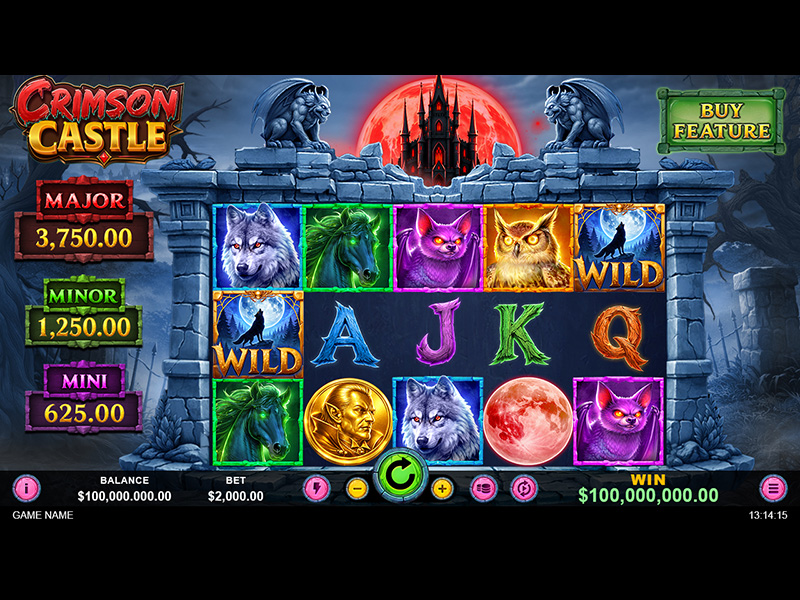
| Golden Coin Rules | - Displays a value that can be awarded during Hold & Spin Feature.
|
| Collector (Moon) Rules | - Collect all the prizes from other Special Symbols
|
| Jackpot Mini Rules | - During the Hold & Spin Feature, it awards the Mini Prize.
|
| Jackpot Minor Rules | - During the Hold & Spin Feature, it awards the Minor Prize.
|
| Jackpot Major Rules | - During the Hold & Spin Feature, it awards the Major Prize.
|
| Wild Rules | - Substitutes for all non-Special Symbols
|
| Hold & Spin Feature Trigger | - The Hold & Spin Feature is triggered when 6 or more Special Symbols land anywhere on the gameboard during a spin.
|
| Hold & Spin Feature Rules | - Special Symbols include:
- Golden Coin Symbol
- Moon Symbol
- Mini Symbol
- Minor Symbol
- Major Symbol
- When the Hold & Spin Feature is triggered, all Special Symbols are locked in place and 3 respins are awarded.
- During the Hold & Spin Feature, all unlocked positions continue spinning.
- If a new Special Symbol lands during a respin, it is locked in place and the respin counter is reset to 3.
- If a Moon Symbol lands during the Hold & Spin Feature, it collects the current values of all Special Symbols displayed on the gameboard, including Mini, Minor, and Major Symbols. The collected values are added to the Moon Symbol’s value, and the respin counter is reset to 3.
- During the Hold & Spin Feature, Multipliers may be randomly assigned to one or more positions on the gameboard.
- A Multiplier may be assigned to a position without a Special Symbol. If a Special Symbol lands in that position during a subsequent respin, the Multiplier is applied to the value of that Special Symbol.
- If a Multiplier is assigned to a position that already contains a Multiplier, the values of both Multipliers are added together.
- Multipliers apply to the value of the corresponding Special Symbol when the feature ends or when that value is collected by a Moon Symbol.
- The Hold & Spin Feature ends when all respins have been used and no new Special Symbol lands.
- At the end of the feature, the total value of all collected and remaining Special Symbols is awarded.
|
| Triggering Moon Feature Trigger | - The Triggering Moon Feature may be triggered randomly whenever at least 1 Special Symbol is present on the gameboard.
|
| Triggering Moon Feature Rules | - When triggered, additional Special Symbols are awarded and placed on random positions on the gameboard.
- A sufficient number of Special Symbols are awarded to reach the 6 Special Symbols required to trigger the Hold & Spin Feature.
- Awarded Special Symbols are assigned random values in accordance with the game rules.
- Once 6 or more Special Symbols are present on the gameboard, the Hold & Spin Feature is triggered and continues according to its standard rules.
|
| Buy Feature Trigger | - The Buy Feature allows the player to purchase a triggering spin for a selected feature at any time via the Buy Feature panel. Only one Buy Feature may be purchased at a time.
|
| Buy Feature Rules | - When a Buy Feature is purchased, the triggering spin will be played automatically and will activate the corresponding feature.
- All rules applicable to the triggered feature apply when activated through the Buy Feature.
|
| Graphics Quality Rules | - The Graphics Qualityoption allows the player to optimize visual performance based on your device’s capabilities, without affecting audio playback.
- By default, the game starts in High Definition(HD)mode, delivering full-quality graphics, visual effects, and animations.
- In case of performance issues, the player can switch to Standard Definition (SD)mode, which reduces graphical complexity for smoother gameplay.
- Audio remains fully enabled in both HD and SD modes, ensuring the game’s sounds and music continue uninterrupted.
- The player can change the Graphics Quality settings at the Loading Screen before entering the game or anytime through the Settings menu.
- Once a new Graphics Quality option is selected, the game will automatically reload to apply the changes.
- The Player can choose the mode that best suits their device performance to ensure the best gaming experience.
|
| Platform | Download, Instant Play, Mobile |
| Reels | 5 |